When an AI answer describes the wrong product variant, identify the exact item and offer before rewriting the product page. Compare the catalog record, submitted feed, linked variant, visible price and availability, and structured data for the same seller and market. Repair the first confirmed mismatch, verify the published result, and then inspect later answers under comparable conditions.
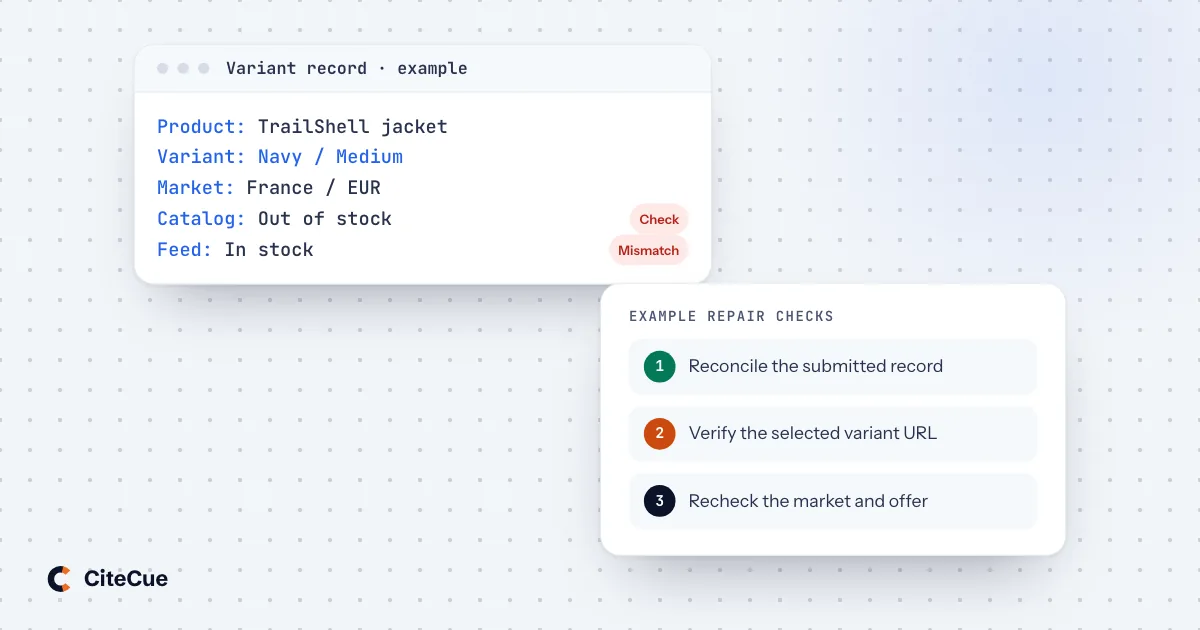
A shopper asks about a navy jacket in medium. The answer names the right jacket but shows the black version, quotes the starting price of another size, and says it is available because some variants remain in stock. A brand mention alone would miss the problem: the shopper still cannot buy the item described.
For this ecommerce AEO task, the unit of investigation is the purchasable variant and its offer. The broader guide to pricing pages in AI answers covers commercial explanations and plan boundaries. This guide focuses on catalog identity, variant selection, and the delivery of changing product facts.
Establish which item the answer actually describes
Preserve the response before changing the store. Record the question, engine or product surface, run time, locale, requested delivery market, answer text, and visible source or merchant links. If the interface shows a product card, save its title, image, seller, displayed price, and destination too.
Separate the product family from the variant and offer:
| Level | Question to settle | Example distinction |
|---|---|---|
| Product family | Which model or product line is this? | TrailShell jacket |
| Variant | Which specific configuration is being described? | Navy, medium |
| Offer | Who sells that variant, on what terms, in which market? | A particular retailer's offer for delivery to France |
| Observation | When and under which conditions was it checked? | Recorded time, currency, selected location, and session state |
TrailShell is a fictional example throughout this article. The same method applies to storage capacities, pack sizes, materials, and other options that change what a customer receives.
Classify the error narrowly. A product image may show another color while the written description is correct. A merchant may offer the right variant at a different price from your own store. A response may be too vague to identify a variant at all. Keep those assessments separate; uncertainty is a useful finding.
Open the cited or linked source and check what it supports. A product-family page saying “sizes available” does not establish that the requested size is available. Likewise, a link to your domain does not establish that every displayed fact came from your current offer.
Build a variant record the team can reconcile
Choose one internal catalog record as the reference for the affected item. Include the parent group, item identifier, variant attributes, legitimate product identifiers where available, and the relevant offer. Use identifiers maintained by your catalog team rather than asking a language model to generate them.
Google's item-group ID guidance distinguishes the shared group identifier from the unique IDs of individual variants. It instructs merchants to submit variants separately with the same group ID and to align grouping with the landing-page experience. Those are Google Merchant Center requirements; other destinations need their own field mapping.
A practical reconciliation record should contain:
- the internal SKU and the identifier submitted to each destination;
- the parent group and the attributes distinguishing this variant;
- the seller, target market, currency, condition, and pack or quantity;
- the current offer price, promotional conditions, and availability;
- the URL that selects the intended variant; and
- the catalog revision, export time, submission status, and public verification time.
Keep parent-level facts and variant-level facts distinct. A shared model description can belong to the group. Availability of a particular size belongs to that size's offer. A replacement model or a bundle with different contents may need its own product identity rather than being grouped together merely because the names resemble one another.
Compare the feed with the page a fresh visitor receives
Inspect the actual submitted or processed product record when the destination makes it available. A correct source database does not demonstrate that an exporter, mapping rule, or scheduled submission delivered the same values.
Then open the submitted URL in a fresh session. Follow redirects and confirm the selected options, image, price, currency, availability, and purchase state. Repeat on the relevant mobile layout if its routing or selectors differ. Record the final URL as well as the one submitted.
Google's product-link documentation recommends stable links with the correct variant selected. Its example uses a URL parameter to select a particular color. For your own audit, verify that the selection survives redirects and does not depend on a cookie from the merchandiser's previous visit.
Consider this fictional store audit:
| Surface | Observed state | Assessment |
|---|---|---|
| Catalog | Navy, medium; out of stock | Reference state at the recorded time |
| Submitted product record | Navy, medium; in stock | Availability export is stale |
| Submitted link | Opens black, small | Destination loses variant selection |
| Product page after manual selection | Navy, medium; out of stock | Selected page reflects the catalog |
| Later AI answer | Names navy, medium as available | Answer still needs its own source investigation |
This identifies two controlled defects worth repairing: the availability export and the landing URL. It does not establish that either defect caused the complete AI answer. Preserve that distinction while investigating which sources appeared.
Avoid using the family page's lowest price as a substitute for every variant price. Similarly, an “available” badge for the family should not obscure which options are sold out. Give shoppers enough visible detail to check the selected item without reverse-engineering the feed.
Make product markup describe the same variant relationships
Inspect the rendered product data alongside the visible page. Check whether identifiers, images, attributes, and offers refer to the intended items. Watch for templates that attach the default variant's offer to every page or retain an old offer after a stock change.
Google's product-variant structured-data documentation uses ProductGroup with properties including hasVariant, variesBy, and productGroupID, alongside Product entities. Its technical guidelines require unique variant identifiers and describe direct URLs that preselect each variant. It also distinguishes single-page and multi-page implementations, including their canonical handling.
Match the implementation to your actual storefront design. Give the developer representative URLs for the group, an available variant, and an unavailable variant. Validate the relationships and offer values across those examples. Follow the documented requirements for the Google feature you are implementing rather than treating a generic schema check as the whole acceptance test.
Correct markup can support Google's documented product experiences. It does not demonstrate selection in an AI answer or establish how another platform consumes your catalog. The guide to structured data and AI answers explains that broader boundary.
Treat changing stock and prices as a publication pipeline
Stock and price repairs need an owner and a delivery check. Map the path from inventory or pricing configuration through the storefront, markup, export, destination processing, and public offer. Record where a value first diverges.
Google's availability requirements call for consistency across product data, the landing page, structured data where present, and checkout. They explicitly address availability of the same variant. Its price requirements similarly require the submitted amount and currency to match the applicable landing-page and checkout price.
Use those documents for Google's destination-specific rules. Maintain a corresponding checklist for every other channel you actually submit to. Feed acceptance, public display, and an assistant's later response are different observations; give each its own timestamp.
Prioritize samples that expose mapping failures: one sold-out size in an otherwise available family, a color with a different price, a sale ending, or a product offered in more than one market. A sample is useful for finding defects, but it does not certify an entire catalog. Expand the audit when the failure points to a shared template or export rule.
For market-specific offers, compare the same country, seller, and currency throughout. Record delivery restrictions and promotional eligibility when they affect the buying decision. Use the multilingual AEO guide when the investigation also involves language and regional page differences.
Test product accuracy and shopping discovery separately
Create a small set of questions with explicit purposes:
| Question type | Fictional example | Review focus |
|---|---|---|
| Named variant | Is the navy TrailShell jacket available in medium from this retailer for delivery to France? | Variant, seller, market, and availability |
| Variant comparison | What differs between the medium and large TrailShell jackets? | Whether stated differences have evidence |
| Offer check | What is this retailer's price for the navy medium TrailShell jacket in euros? | Exact offer and any stated conditions |
| Category discovery | Which rain jackets fit my budget and intended use? | Relevant consideration set and source quality |
These are suggested diagnostic prompts, not a record of customer searches. Supply the product name when testing a known item's facts. Keep broader discovery questions separate so a corrected branded answer does not masquerade as increased category visibility.
Put the named-item questions in Prompts Monitoring alongside their market constraints. CiteCue stores each complete response, so a reviewer can check whether the selected size or configuration is actually stated. Preserve a screenshot of any separate shopping card and reconcile it with the catalog record using the procedure above.
Record response accuracy, variant identity, cited source, and the offer's observation time in the review. Price and stock can change between an answer and an audit. When you lack a contemporaneous record, mark the historical claim unresolved rather than judging it solely against today's inventory.
Close the repair at the layer your team controls
Route the work to the first confirmed defect. Catalog operations can repair grouping or identifiers; the integration owner can fix an export; the storefront team can repair variant selection; and merchandising can clarify the visible offer. Use CiteCue's content fix workflow for confirmed page-content gaps alongside the appropriate commerce-system ticket.
Write an acceptance condition that names the item and market. For example: “The submitted link opens the navy medium variant in a fresh session, and its displayed availability agrees with the catalog and submitted record at verification time.” Keep evidence from each surface with the ticket.
After that controlled repair is verified, repeat the original diagnostic questions and inspect later answers. Report exactly what changed in the store and what you observed in the responses. A useful ecommerce AEO result is an identifiable product, a faithful offer, and a buying path that lets the shopper confirm both.