Short answer: the Model Context Protocol is how an AI agent reaches a tool's real data instead of guessing from a pasted screenshot. CiteCue now runs a remote MCP server, so Claude, ChatGPT, Cursor, Claude Code or Codex can read your scans and act on them. The interesting part isn't that it exists — it's which 22 things an agent is allowed to do, and what it is never allowed to do.
A lot of marketing work has quietly moved into a chat window. Not the reporting — the reporting still happens in dashboards — but the thinking. Someone asks an assistant to explain a drop, draft a comparison page, or turn a finding into a ticket.
Right now the usual way to get data into that conversation is to describe it. You paste a screenshot, or type out the numbers you remember. The agent then reasons about your paraphrase of your data, which is a worse input than your data.
What MCP actually is
The Model Context Protocol is a standard for how an AI client discovers and calls tools that a server exposes. A remote MCP server is, from the outside, one HTTP endpoint. Your agent connects to it, asks what tools exist, and gets back a list with names, descriptions and argument schemas. When the model decides it needs one, it calls it and gets a structured result.
It is not a browser plugin and it is not scraping. It's closer to an API with two properties a plain API doesn't have: the tools are self-describing, so the model can work out which one answers the question in front of it, and the whole thing is permissioned per user, so the agent's access is exactly the access the person connecting it already had.
That second property is where all the interesting design decisions live.
The question worth asking before you connect anything
Every SaaS product now faces the same design problem: what should an autonomous agent be allowed to do with your account? It's tempting to answer "everything the UI can do" — the endpoints already exist, after all. That's the wrong answer, and it's worth knowing what a considered one looks like before you connect any tool to any agent.
Four rules we'd defend on any product, not just ours:
Reads should come from the same place the product's own assistant reads. If the external agent and the in-app assistant run different queries, they will eventually disagree about your visibility score, and you'll have no way to tell which one is lying.
Writes should be narrow and reversible. An agent acting on a misread number should cost you an undo, not a recovery.
Deletes shouldn't exist. There is no version of "the agent misunderstood" that should end with your prompt history gone.
Billing and team membership stay out entirely. These are the two surfaces where a mistake has consequences outside the product.
What that produced: 22 tools, none of them destructive
Seventeen reads, five writes, no deletes.
The reads wrap the exact tool registry the in-app AI assistant already uses — same names, same queries — so the dashboard assistant and an external agent physically cannot disagree about what your numbers are. On top of those, the agent can list your projects, list and poll scans, and pull the AI Readiness and Agent Usability reports.
| What it can read | Examples |
|---|---|
| Headline metrics | Visibility score, brand mention rate, citation share, trend, top competitor |
| Competitive detail | Share of voice, per-topic win/loss grid against each competitor |
| Prompts | Tracked prompts, per-prompt detail with the per-model breakdown and recent runs |
| Sources | Citation analysis and the most influential domains in your category |
| Diagnosis | All 13 ranking factors with the gap to competitors, standing insights, the opportunity queue |
| Everything else | Sentiment, AI referral traffic, the full audit report, scan status, readiness and agent-usability checks |
The five writes are deliberately dull: start a scan, add prompts, edit a prompt, add a competitor, move an opportunity through the fix queue's real status list. Each one calls the identical service its dashboard button calls, so plan caps, project roles and preconditions are the same whether a human clicked or an agent asked. Retiring a prompt is done by disabling it, not deleting it — reversible by design.
Two ways in, because there are two kinds of client
Command-line agents like Claude Code, Cursor and Codex authenticate with a header. You paste a config snippet containing an organization API key and you're connected.
Browser-based connectors like Claude.ai, Claude Desktop and ChatGPT can't do that — nobody should be pasting long-lived keys into a hosted connector. Those go through OAuth: you click Connect, sign in, and approve a consent screen that names exactly what the agent gets.
Neither flow can stand in for the other, which is why both exist. What they share is scoping: every tool takes a project id, and a credential reaches only the projects its holder could already open. An OAuth connection is tied to the person who approved it, not to the organization, so a connector inherits that person's access rather than the account's. The agent finds out which projects those are by asking.
Revocation should mean "now", not "eventually"
This is the detail worth stealing regardless of which tools you connect to your agents.
A signed access token can't be un-signed. Plenty of implementations therefore treat "revoke" as "stop issuing new tokens", which means a disconnected agent keeps working until the old one expires — sometimes days. CiteCue checks a live consent record on every single request, so hitting Revoke takes effect on the agent's very next call.
When you connect any tool to an agent, it's worth finding out which of those two things the Revoke button does.
Errors an agent can actually relay
Two small choices that matter more than they sound.
The plan gate fires when a tool is called, never when the agent connects. A locked organization still completes the handshake and still sees the tool list; calling a tool returns a readable message saying MCP isn't in this plan, with an upgrade link. The agent repeats that to you. The alternative — rejecting the connection — surfaces in most clients as a bare "connection failed", which tells you nothing.
Asking for a project in an organization you don't belong to returns "not found", not "forbidden". "Forbidden" would confirm the project exists, which is a small information leak that costs nothing to avoid.
What people are actually asking it
The pattern that's proven most useful isn't conversational reporting. It's handing a finding to something that can act on it.
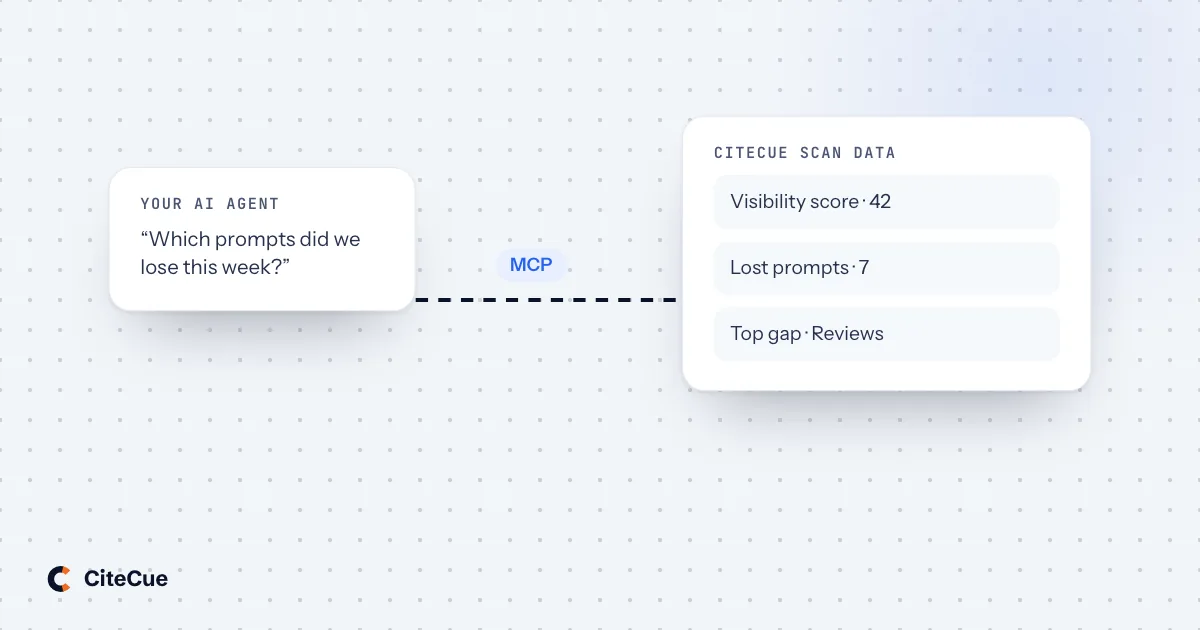
- "Which prompts did we lose this week, and to whom?" — then, in the same session, drafting the comparison page that the factor gaps say is missing.
- Pulling AI Readiness into a coding agent that's already in your repository, and letting it fix the crawlability problems against your actual code. We don't need access to your codebase for that to work.
- "Start a scan and tell me when it's finished" — a scan, then polling its status, without leaving the terminal.
- Weekly client updates for agencies, assembled from the real numbers rather than retyped.
Where this stops
It's on Optimize and Agency. MCP access is also included in Optimize's seven-day free trial. See pricing for what each tier includes.
The write surface will stay small. No deletes, no billing, no team management, and no editing a project's AI context — that context is what prompt and fix generation are built from, so handing an agent broad edit rights over it would let one bad instruction reshape every metric downstream.
Agent actions spend your allowances. A scan an agent starts counts against the same manual-scan allowance a scan you start does, and adding prompts stops at your plan's active-prompt cap. There's also a rate limit of 120 requests a minute per credential.
The agent is still a language model reading numbers. It can misread a trend or over-explain a two-point move. The dashboard remains the record; the agent is a faster way to interrogate it.
Client support moves fast. Where the connector settings live in Claude, ChatGPT or Cursor changes more often than our end does. The connection instructions in the app track the current versions, which is a better source than any blog post — including this one.