AI crawler logs show requests to your website and how your infrastructure handled them. Read them by verified requester, documented purpose, URL, response, and delivery layer. They can reveal blocked search fetches, broken redirects, or repeated errors on important pages. A request does not establish that a page was indexed, used in an answer, cited, or opened by a buyer.
A marketing team sees an increase in requests labeled “AI bots” and reports growing visibility. A developer sees no matching origin requests and concludes that assistants never reach the site. Both conclusions can outrun the evidence. The first combines different kinds of automation; the second may miss requests answered by a CDN before they reach the origin.
This guide gives web and marketing teams a way to audit the requests they actually receive. For deciding crawler policy and understanding discovery, indexing, and retrieval, begin with the broader AI crawler access guide.
Classify the request by its documented job
Do not combine every recognizable AI user-agent into one performance total. A search crawler, a training crawler, and an agent fetching a page for a user have different jobs. Keep the role alongside the requester's name.
The current OpenAI crawler documentation distinguishes these roles:
| Requester | Documented purpose | Interpretation for an audit |
|---|---|---|
| OAI-SearchBot | Surfacing sites in ChatGPT search | Investigate access to public search-relevant pages |
| GPTBot | Crawling content that may be used for model training | Review against your training policy |
| ChatGPT-User | Visiting pages in response to user actions | Investigate the requested task and delivered page |
OpenAI says its search and training settings are independent and that, when both bots are allowed, one crawl's results may serve both purposes. That limits what request counts can tell you about downstream use. ChatGPT-User is also not the control that determines automatic Search inclusion.
Perplexity's crawler documentation separately describes PerplexityBot and Perplexity-User. Use the documented automated-search and user-request roles in your classification rather than treating a user-triggered fetch as a person visiting your site in a browser.
Maintain a small lookup record: requester, role, official documentation URL, identity-verification method, and date reviewed. Match stable crawler tokens while retaining the original user-agent string for investigation. Version strings and published addresses can change, so a copied list should have an owner and a review trigger.
Verify identity before trusting a user-agent label
A user-agent is a declaration sent with the request. Anyone able to send an HTTP request can choose that string. Treat “contains GPTBot” as a candidate filter, then establish whether the request matches the owner's verification guidance.
Use the original client address from a trusted edge or proxy record, not simply the address of your CDN connection at the origin. Do not trust an arbitrary forwarded-address header unless your infrastructure validates and controls it.
For providers publishing address ranges, compare the client IP with the current official list for that specific requester. Perplexity's documentation recommends checking both user-agent and source address and links its maintained JSON endpoints. Record which list you used and when; an old export may no longer describe today's infrastructure.
For Google requests, follow Google's crawler-verification procedure. It supports matching the appropriate published address list or checking reverse DNS, the expected domain, and a forward lookup that resolves back to the original address. A hostname that merely contains the word “google” is insufficient.
If your edge supplies a verified-bot classification, retain that signal too. Cloudflare's current documentation describes identity methods including signatures, published address lists, and reverse DNS. Its behavior categories can also include more than one role per bot. Preserve the provider and classification details instead of replacing them with a single “AI” flag.
Give each record an identity state: verified, unverified, or unknown. Unknown can mean the necessary field or verification method is missing. Keep it visible in the report; do not silently promote it to verified or assume it is malicious.
Collect evidence from the layer that answered the request
Origin logs alone are an incomplete view when another layer can answer, redirect, block, or challenge requests first. Begin at the public edge and correlate with the origin when a request reaches it.
A useful audit export contains:
| Field group | What to retain | Question it answers |
|---|---|---|
| Time and correlation | Timestamp, time zone, request ID | Can the same event be located across systems? |
| Request | Host, method, path, relevant query context | Which resource was actually requested? |
| Identity | User-agent, trusted client IP, verification result | Who can reasonably be attributed to the request? |
| Delivery | Client-facing status, origin status when present, content type, bytes | What response did the requester receive? |
| Infrastructure | Cache result, security action, rule identifier | Which layer served or stopped the request? |
Cloudflare's HTTP request log reference defines EdgeResponseStatus as the status returned to the client and separately documents origin, cache, and security fields. Use the distinction in your own logging platform. Field availability depends on the export and product configuration; mark unavailable evidence explicitly.
Do not double-count one correlated event as both an edge request and an origin request. Also document sampling, retention, and missing time windows before comparing totals. A logging change can create a traffic change on paper.
Keep sensitive query values and credentials out of the shared marketing export. The technical owner may need controlled access to raw records, while a page path, correlation ID, and summarized result are usually enough for an editorial ticket.
Inspect the delivered page, not only the status code
A 200 status confirms an HTTP success response. It does not prove that the response contains the intended article or product information. Inspect representative responses when a pattern looks suspicious: an error template, login page, empty shell, or challenge can undermine the apparent success.
Group requests by useful page families: product, pricing, documentation, research, blog, and infrastructure resources. Requests to robots.txt, a sitemap, an image, or a script should not inflate a count described as “content pages fetched.” Preserve raw paths, then normalize URL variants in a separate reporting field so query strings do not fragment the same page.
Read status patterns in context:
- Redirects: trace the chain and destination. A redirect to an unrelated homepage is a different outcome from a redirect to an equivalent replacement.
- Blocked or challenged requests: inspect the actual security action and matching rule. A status code by itself does not tell you whether the application or firewall generated it.
- Rate limits: correlate the affected requester, page, time window, and configured limit before changing a rule.
- Server failures: identify whether the edge, origin, or an upstream dependency failed, then reproduce the affected public route.
- Cached responses: check which version was delivered when investigating an old price, removed section, or outdated policy.
Do not disable a broad security control to make a crawler total increase. Establish the legitimate requester, affected public paths, and intended access policy, then make a scoped repair with a verification condition.
CiteCue's AI Readiness checks provide crawler-policy, sitemap, markup, and connected index-status evidence. Pair those findings with the infrastructure records held by your web team to investigate whether the intended access policy became the actual delivered response.
Work through an example request audit
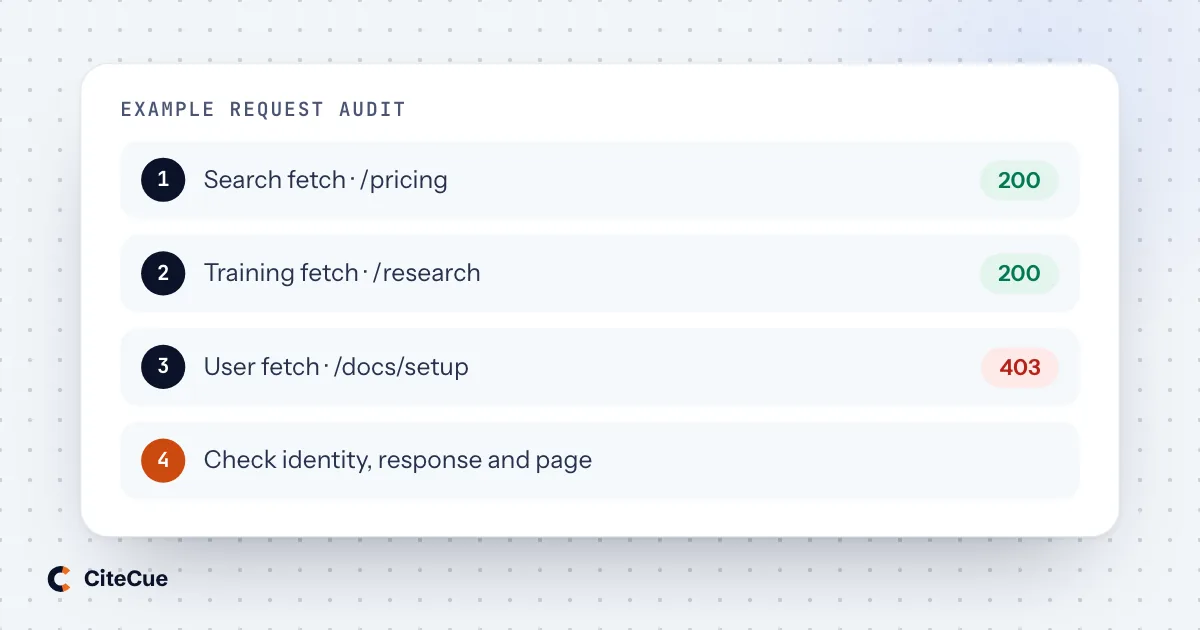
The following is a fictional export designed to demonstrate interpretation. It contains no customer measurements, and the “verified” labels assume the identity checks above were completed.
| Request | Identity | Delivered result | Supported conclusion |
|---|---|---|---|
OAI-SearchBot, GET /pricing |
Verified | Edge 200, intended pricing text, cache hit |
The search requester received this pricing response |
GPTBot, GET /research |
Verified | Edge 200, intended research text |
The training crawler fetched the page under the configured policy |
Perplexity-User, GET /docs/setup |
Verified | Edge 403, named firewall rule |
A user-request fetch was blocked by that rule |
OAI-SearchBot, GET /robots.txt |
Unknown | Edge 200 |
A request using that label received robots.txt; identity remains unresolved |
OAI-SearchBot, GET /old-guide |
Verified | Redirect to an unrelated category page | Investigate whether the old guide has a valid replacement |
This export supports three different actions. Check the policy governing the training fetch. Review the scoped block on public documentation. Decide whether the old guide needs an equivalent redirect or restoration. The successful pricing request needs no content rewrite just because it appears in a crawler report.
It also supports an evidence limit: none of these rows establishes a citation, recommendation, or human session. A team can verify delivery and still need to inspect the answers in which it wants to appear.
Connect request findings to answer evidence carefully
Use logs to answer “could this requester obtain this page at this time?” Use recorded AI answers to answer “was the brand mentioned or the page cited in this observed response?” Use referral analytics to investigate recorded human visits. The datasets can inform the same investigation without sharing a denominator.
AI prompt monitoring in CiteCue records the full responses to the questions you choose to track. AI citation tracking helps identify the domains appearing in those answers. Compare affected URLs and time windows with the technical audit, while remembering that a tracked prompt set is a sample you configured rather than a feed of every buyer's question.
Avoid joining a crawler request to a specific prompt simply because their timestamps are close. A page can be obtained earlier, reused, or selected through an intermediary. Unless the relevant system exposes a reliable correlation, label the connection as a hypothesis.
Likewise, absence from your captured logs does not prove that a page was absent from every answer. Check whether the relevant layer was logged, whether records were sampled, and whether the observation window covers the possible fetch. For the relationship between answer exposure and visits, use the separate guide to diagnosing AI citations and referral traffic.
Report the access problem and its verification condition
End the audit with an actionable record: affected public URLs, verified requester and role, delivered response, evidence source, access policy, owner, proposed repair, and a check that can confirm completion.
For example: “Verified search requests to these three pricing URLs were blocked by this rule. The intended policy permits access. The web owner will adjust the rule for the documented requester and public paths, then verify the response and pricing text in later requests.” That is a technical finding someone can review and close.
Keep confirmed content or page-structure gaps in CiteCue's content fix workflow, with the answer and affected URL attached. Keep firewall and logging repairs with the infrastructure owner. A later citation improvement may be encouraging, but it does not replace the immediate check that the access repair worked.
A useful crawler report explains who requested which page, what they received, what remains unknown, and which action follows. Request volume is supporting operational evidence. The marketing outcome still needs its own observation.