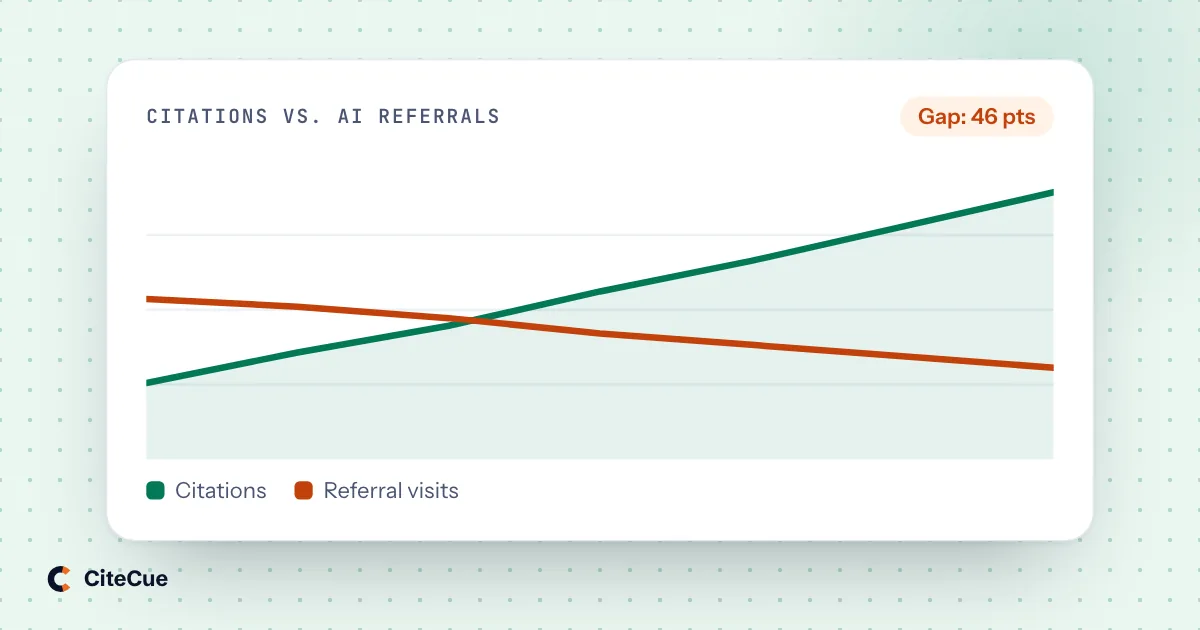
AI citations and AI referral traffic measure different events. A citation means an answer displayed your page as a source. A referral session means someone followed a link and your analytics recorded the visit. Either can rise while the other falls. Diagnose the gap by aligning the date range and engine, checking analytics collection, comparing cited URLs with landing pages, and separating prompts that invite a click from prompts that resolve inside the answer.
The mismatch is easy to misread. A team sees more citations and expects more sessions. When traffic stays flat, it assumes the citation data is wrong or the content failed. The opposite can be just as confusing: AI referrals rise while a tracked citation rate barely moves.
Neither pattern tells you what happened on its own. Start by making the two datasets comparable, then trace where the journey separates.
Define the two events before comparing the charts
A citation is exposure inside an answer. Microsoft's current AI Performance documentation defines Total Citations in Bing Webmaster Tools as the number of times a source is displayed in supported AI-generated answers. Its page-level citation activity counts how often a URL is cited, while explicitly warning that this does not show page importance, ranking, or placement in an individual answer. That distinction matters: a displayed source is not evidence that a person opened it.
A referral session starts later. Google Analytics describes Session source as the publisher or source that originated a new session. The visit exists in the report only after a person reaches the site and the analytics implementation records the session.
OpenAI connects those two stages in its current publisher FAQ. It says ChatGPT adds utm_source=chatgpt.com to referral URLs so publishers can identify inbound traffic in tools such as Google Analytics. The parameter helps classify a click; it does not count citations that nobody opens.
Use separate names in reports:
| Metric | Event being counted | What it cannot prove |
|---|---|---|
| Citation | A page was shown as a source in a supported AI answer | That a user saw or clicked it |
| AI referral session | A visit was attributed to an AI source | That the visitor first encountered the page as a citation |
| Key event or conversion | A recorded action happened during or after a session | That the citation alone caused the action |
Once the events are clear, divergence becomes a diagnostic signal instead of an analytics contradiction.
Make the comparison use the same scope
Before explaining a trend, confirm that both sides cover the same period, engines, markets, pages, and questions.
An AI visibility scan may track a fixed prompt set across selected platforms. An analytics report may contain visits from every AI surface capable of sending traffic. One chart might use a weekly citation rate; the other might show monthly sessions. A percentage can also move because its denominator changed, even when the raw citation count did not.
Build a comparison table with these fields:
| Field | Citation dataset | Referral dataset |
|---|---|---|
| Date window | Scan dates and time zone | Session dates and property time zone |
| Platform | Answer engines included | Session source or source/medium values included |
| Geography | Prompt market or locale | Visitor country or region |
| URL | Canonical cited page | Landing page after redirects |
| Query context | Exact tracked prompt | Usually unavailable; use landing-page purpose cautiously |
| Count | Raw citations and eligible answers | Sessions, users, and relevant key events |
Do not compare an all-engine traffic total with one engine's citations and call the difference a performance change. Segment first. CiteCue's Prompts Monitoring keeps the engine, exact question, answer, date, mention, and cited sources together, which gives the citation side of this table a stable scope.
Rule out collection problems before changing content
If referrals dropped suddenly, test the measurement path before rewriting a cited page.
Start with the destination URL from a live AI result. Follow it through every redirect and confirm that useful query parameters survive. Load the final page and verify that the analytics tag starts a session under the consent state you are testing. Check whether the hostname, cross-domain setup, cookie banner, or recent analytics release changed during the same period.
Then inspect Session source / medium and landing page together. Google's documentation says the Traffic acquisition report uses session-scoped dimensions for the source that started the session. Its guidance on (direct) / (none) explains that traffic appears as direct when Analytics does not have a clear referral source; redirects or missing campaign information can contribute to that loss of attribution.
Use this order:
- Open a current AI citation and copy its outbound URL.
- Confirm the expected source parameter or referrer at the first request.
- Confirm redirects preserve the destination and tracking information.
- Check that the final page loads the analytics configuration and records
session_start. - Compare raw AI-source sessions with direct traffic and unassigned values around the change date.
- Review consent, tag-manager, domain, and channel-group changes made in the same window.
This is a measurement check, not a reason to force every platform into one UTM convention. Platforms expose referrals differently and can change their link behavior. Keep a maintained list of the source values your own property actually receives. CiteCue's tutorial on measuring AI referral traffic covers the reporting setup, while AI Readiness keeps the referral connection next to crawl and index checks.
Read the common divergence patterns
After the scope and collection checks pass, the shape of the mismatch tells you where to look next.
Citations rise while referrals stay flat
Inspect the prompts and cited pages. An informational question may be fully resolved inside the answer, so the source earns visibility without creating a strong reason to visit. A cited definition, statistic, or short explanation can support the response while a buyer remains in the chat.
This is an inference to test, not a universal rule. Compare informational prompts with questions that naturally require more detail, such as methodology, compatibility, pricing conditions, implementation steps, or a downloadable resource. Check whether the cited page gives the reader a useful next step that matches the question.
Also look for concentration. Ten additional citations to one low-intent glossary page are different from ten citations spread across product, comparison, and pricing pages. Citations & Competitors helps identify which domains and pages are being used, so the team can review the actual citation mix rather than treating every citation as commercially equivalent.
Referrals rise while tracked citations stay flat
First check whether the visits come from engines, countries, or prompts outside the monitoring set. A tracked prompt panel is a sample of buyer questions, while referral analytics can capture other journeys.
Next compare landing pages. Traffic may be reaching a page that is not cited in the prompts you monitor. It may also come from a linked source surface that your citation report does not cover. Keep the conclusion narrow: the sessions are real, but the tracked scan does not yet explain them.
Citations and sessions rise, but outcomes do not
Now the gap sits after the landing page. Review engagement and relevant key events by AI source and landing page. Check whether the cited page answers the query but leaves the next action unclear, sends the visitor to an unrelated CTA, hides the needed detail behind an interaction, or makes the buyer repeat information already supplied in the question.
Do not use one conversion rate as a verdict on every cited page. A research article, a pricing page, and a contact page have different jobs. Define the next useful action for each page type, then judge the path against that purpose.
Everything falls at once
Check shared causes first: blocked crawlers, removed pages, changed canonicals, broken redirects, analytics releases, or a prompt-set change. A simultaneous fall does not prove one root cause, but it is a reason to inspect technical and measurement changes before planning new content.
Run a repeatable investigation instead of explaining one chart
Use a fixed review window long enough to include several scans and enough sessions to avoid reacting to one answer or one visit. The right window depends on your scan cadence and traffic volume; there is no universal threshold.
For each review:
- Record raw citation counts, citation rate, and the number of answers in scope.
- Export cited URLs by engine and prompt group.
- Export AI-source sessions, landing pages, engagement, and relevant key events for the same dates.
- Normalize URL variants so redirects, query strings, and trailing slashes do not split one page into several rows.
- Label prompts by reader purpose: discovery, comparison, validation, implementation, or action.
- Identify whether the divergence belongs to measurement, coverage, page intent, or the post-click journey.
- Assign one testable change and check the same slices after it ships.
Keep uncertainty visible. If a citation platform aggregates several surfaces, say so. If analytics cannot recover a missing referrer, label those sessions unknown. If a landing page suggests a likely query intent but does not prove it, describe the conclusion as an inference.
Turn the gap into the right kind of work
Different diagnoses lead to different actions.
| Diagnosis | Appropriate next step |
|---|---|
| Tracking parameters disappear in redirects | Repair the measurement path and validate it with a live click |
| Citations concentrate on informational pages | Decide whether those pages need a relevant next step, without weakening the answer |
| High-intent prompts cite competitors | Inspect their cited evidence and your missing or weaker source |
| AI sessions land on the wrong page | Fix links, redirects, canonical signals, or page targeting |
| Visits arrive but the next task fails | Improve the page's decision path and test the task again |
| The datasets cover different engines or markets | Align reporting scope before making an editorial change |
CiteCue's Content Fixes can organize confirmed citation and content gaps into a work queue. Keep analytics repairs and conversion-path problems labeled separately; publishing another article does not fix a stripped UTM parameter or an unusable checkout.
The useful outcome is not forcing citations and sessions into one line. It is knowing where exposure stopped becoming a visit, where a visit stopped becoming progress, and which evidence supports the next change. Track the two metrics together, preserve their different meanings, and use the gap to choose the right investigation.